
Cara membuat pos Instagram melalui komputer (ms_MY)
Instagram masih lagi belum membolehkan pos dibuat melalui komputer. Jika anda menyunting foto anda menggunakan komputer, anda perlu menghantar foto tersebut kepada peranti mudah alih yang mempunyai app Instagram anda dan membuat pos melalui app tersebut. Tetapi anda boleh membuat pos ke Instagram dengan komputer melalui satu cara workaround. Kami akan menunjukkan caranya di dalam pos ini.
Instagram membenarkan untuk membuat pos melalui pelayar web mudah alih. Anda boleh menggunakan ciri ini untuk membuat pos dari komputer anda. Kebanyakan pelayar web moden mempunyai developer tool yang mempunyai emulasi paparan pelayar web mudah alih. Kita akan gunakan Google Chrome di dalam pos ini sebagai contoh.
1. Pertama sekali, buka pelayar chrome anda dan pergi ke Instagram https://www.instagram.com

2. Pasangkan Developer Tools: klik pada ikon Setting -> More tools -> Developer tools
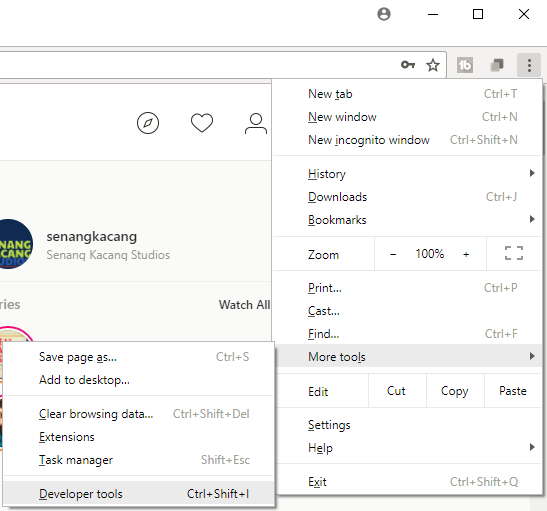
3. Klik pada tool bar peranti mudah alih dan pilih peranti mudah alih anda di bahagian atas dan tekan refresh

4. Sekarang paparan web mudah alih untuk Instagram akan terpapar dan ikon tambah akan muncul di bahagian bawah.

5. Anda boleh klik pada ikon tambah dan membuat pos Instagram baru anda melalui komputer.

Beberapa ciri lain seperti filters tidak terdapat pada paparan ini, namum ianya cukup untuk membolehkan anda membuat pos baru. Ayuh mula membuat pos foto-foto anda dengan mudah melalui komputer anda.
Hantarkan soalan atau komen anda kepada kami melalui komen di bawah.
English version (EN)
Instagram membenarkan untuk membuat pos melalui pelayar web mudah alih. Anda boleh menggunakan ciri ini untuk membuat pos dari komputer anda. Kebanyakan pelayar web moden mempunyai developer tool yang mempunyai emulasi paparan pelayar web mudah alih. Kita akan gunakan Google Chrome di dalam pos ini sebagai contoh.
1. Pertama sekali, buka pelayar chrome anda dan pergi ke Instagram https://www.instagram.com
2. Pasangkan Developer Tools: klik pada ikon Setting -> More tools -> Developer tools
3. Klik pada tool bar peranti mudah alih
dan pilih peranti mudah alih anda di bahagian atas dan tekan refresh
4. Sekarang paparan web mudah alih untuk Instagram akan terpapar dan ikon tambah
akan muncul di bahagian bawah.5. Anda boleh klik pada ikon tambah
dan membuat pos Instagram baru anda melalui komputer.Beberapa ciri lain seperti filters tidak terdapat pada paparan ini, namum ianya cukup untuk membolehkan anda membuat pos baru. Ayuh mula membuat pos foto-foto anda dengan mudah melalui komputer anda.
Hantarkan soalan atau komen anda kepada kami melalui komen di bawah.
English version (EN)


The english version of this post can be found here : http://www.senangkacang.com/2017/12/how-to-post-to-instagram-from-your_13.html
ReplyDeleteSangat berguna untuk sesiapa yang selalu edit gambar di komputer! Tip ini memang memudahkan proses upload tanpa perlu hantar foto ke telefon. Sambil belajar trik baru macam ni, saya juga terjumpa permainan menarik seperti Rope Frog Ninja Hero MOD APK untuk hiburan cepat waktu rehat.
ReplyDeleteArtikel yang sangat membantu 👍 Saya tak tahu sebelum ini yang kita boleh guna developer tools untuk post Instagram melalui komputer. Cara penerangan pun jelas dan mudah ikut. Selain belajar tips seperti ini, saya juga pernah jumpa beberapa tools online yang memudahkan kerja harian seperti Terabox Downloader
ReplyDeleteuntuk urus fail dan download dengan lebih mudah. Terima kasih atas perkongsian!
Sa kabuuan, ang Delta: I-download ang Delta Executor Update na V2.707 [2026] ay hindi lamang isang simpleng software update kundi isang komprehensibong pag-upgrade na nakatuon sa pagpapabuti ng performance, design, compatibility, at security ng application. Ang bawat detalye ay malinaw na pinag-isipan upang matugunan ang pangangailangan ng modernong mobile users.
ReplyDeletehttps://deltaexecutr.ph/
It can be a fun conversation starter with friends and help you bond over shared experiences. The test encourages self-reflection about your personal growth and life choices. It gives you a lighthearted way to see how your experiences have changed over time. Many people take it out of curiosity to compare scores with others. It can also help you recognize how diverse people’s life experiences can be. https://ricepurityofficial.com/
ReplyDeleteGreat and simple explanation about Instagram posting methods. The guide feels beginner friendly and useful for daily users. Delta Executor readers will also appreciate this kind of easy and informative content online.
ReplyDeletePersonal touches like initials, symbols, or favorite quotes can make a black profile picture feel more meaningful. The best black pfp is the one that truly matches your personality and emotions. It should feel natural and comfortable instead of forced. Since profile pictures are often the first thing people notice online, choosing the right one can help create a stronger impression. Black PFP remains one of the best choices because it combines beauty, emotion, simplicity, and style all in one powerful image.
ReplyDeleteI like how this workaround allows us to upload photos from our computers. It reminds me of when I needed to change my gojo pfp and couldn't figure out how to do it from my laptop, now I can use this method to update it easily. This will save me so much time.
ReplyDeleteCara membuat pos Instagram melalui komputer cukup mudah. Masuk ke akun Instagram melalui browser, pnp payslip klik tombol Buat atau ikon +, pilih foto atau video yang ingin diunggah, lakukan pengeditan jika diperlukan, tambahkan caption, lokasi, dan tag, lalu klik Bagikan untuk mempublikasikan postingan. Fitur ini memudahkan pengguna mengelola konten Instagram langsung dari komputer tanpa memerlukan aplikasi seluler.
ReplyDeleteIt is an amazing tool for those people who find it more convenient to handle Instagram through their PC. Developer tool approach is quite easy to comprehend and can save a lot of time during uploading edited pictures. I love discovering new apps like Delta Executor Apk.
ReplyDelete